Shopify Customer Account Migration: SI Team Guide to B2B Delivery Risks

A Critical Shopify Change SI Teams Can’t Ignore
Shopify is transitioning away from legacy customer accounts, introducing a significant change in how authentication, session management, and customer identity function across the platform. While this may initially appear to be a platform-level update, its impact extends far beyond login interfaces. For System Integrator teams, this change directly affects how B2B ecommerce solutions are designed, implemented, and integrated across multiple systems.
The new customer account system alters how authentication flows operate, how sessions are maintained, and how account data is accessed across connected platforms. Because SI teams are responsible for building and integrating these systems, this transition introduces delivery-level complexity that must be addressed early.
Shopify has confirmed that legacy customer accounts are being deprecated, with a full transition expected around 2026. As restrictions increase over time, SI teams must prepare for this shift to avoid delivery disruptions and system instability in ongoing and upcoming projects.
Why This Matters More for SI Teams in B2B Ecommerce
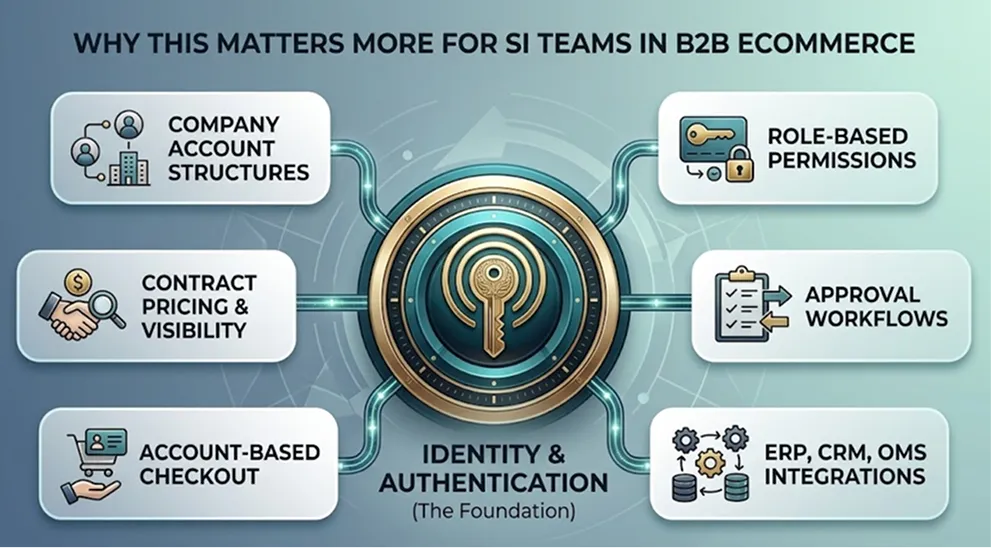
In B2B ecommerce, customer accounts are not isolated features—they are deeply integrated into business operations and system workflows.
SI teams typically implement,
•Company account structures with multiple users
•Role-based access and permissions
•Approval workflows for procurement
•Contract pricing and catalog visibility
•ERP, CRM, and OMS integrations
•Account-based checkout and payment terms
All of these rely on how customer identity and authentication are managed. With Shopify’s new customer account system, changes in authentication and session handling can directly affect how these systems interact. For SI teams, this means the impact is not limited to one component—it extends across the entire architecture.
Customer accounts function as a central layer connecting multiple systems. Any change to this layer must be carefully evaluated to ensure stability across all integrations and workflows.
The Hidden Risks of Underestimating Migration Scope
One of the biggest risks for SI teams is underestimating the scope of migration. While systems may appear stable initially, many dependencies on legacy customer accounts remain hidden within integrations, middleware, and custom workflows. These dependencies often surface only during later stages of delivery or after deployment.
Common risks include,
•Broken or inconsistent authentication flows
•Session handling issues across integrated systems
•Failures in ERP or CRM synchronization
•Instability in middleware and third-party applications
•Disruptions in checkout and ordering processes
•Increased debugging effort during late project stages
Because these issues are not always visible early, they can significantly impact delivery timelines and project outcomes. Without proper validation, SI teams may face reactive troubleshooting instead of controlled execution.
Custom Implementations and Integrations That May Be Affected
Most B2B ecommerce solutions delivered by SI teams are highly customized and integrated across multiple systems.
Over time, these implementations evolve to include:
•Middleware connecting ERP, CRM, and ecommerce platforms
•Custom dashboards and account management interfaces
•Approval and procurement workflows
•Third-party applications supporting subscriptions, loyalty, or analytics
•Custom onboarding and registration flows
Many of these components are built around legacy customer account behavior.
With the transition to the new system, even small changes in authentication or account structure can affect how data flows between systems. This may require reconfiguration, updates, or partial rebuilding of certain components.
Key areas that may be impacted include:
•Integration logic between ecommerce and backend systems
•Custom account management interfaces
•Approval workflows and role-based access systems
•Middleware handling authentication and sessions
•Third-party applications relying on legacy APIs
The SI Challenge — Limited Visibility Across Complex Systems
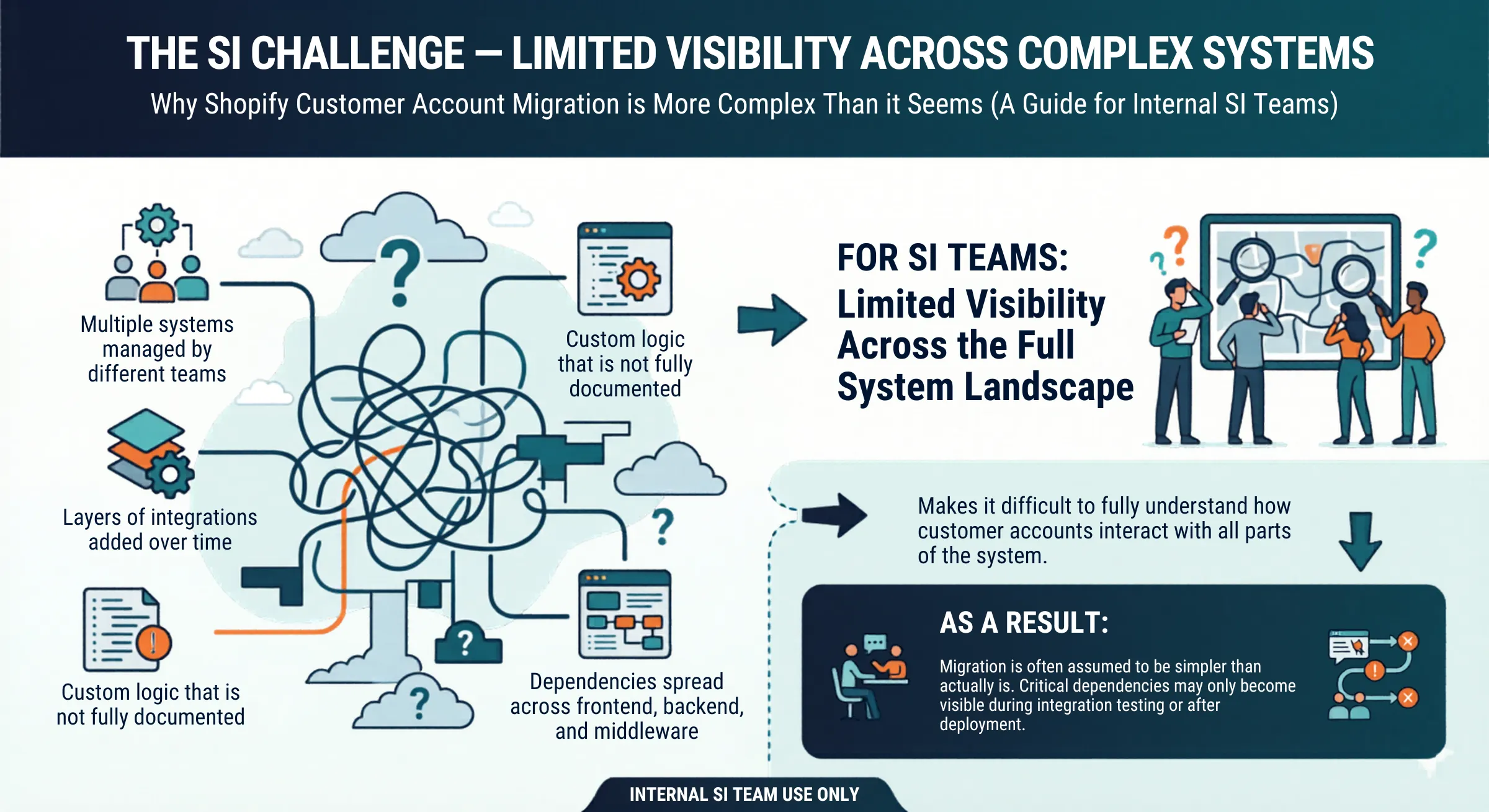
For SI teams, one of the biggest challenges is limited visibility across the full system landscape.
B2B ecommerce environments often involve,
•Multiple systems managed by different teams
•Layers of integrations added over time
•Custom logic that is not fully documented
•Dependencies spread across frontend, backend, and middleware
This makes it difficult to fully understand how customer accounts interact with all parts of the system. As a result, migration is often assumed to be simpler than it actually is. Critical dependencies may only become visible during integration testing or after deployment.
Key Improvements in Shopify’s New Customer Account System
Shopify’s new customer account system introduces a more scalable and flexible foundation for managing customer identity and account interactions.. Key improvements include,
•Pass wordless authentication model
Customers authenticate using one-time verification codes, reducing dependency on password-based systems and eliminating password reset workflows.
•Multi-channel identity access
Supports multiple sign-in methods, including social login providers and Shop login, improving accessibility across user segments.
•Unified account layer
A single authentication layer provides access to all account-related features, creating a centralized and consistent customer experience.
•Streamlined account provisioning
Customer accounts are automatically created upon first login, removing friction from onboarding flows.
•Expanded self-service capabilities
Customers can independently manage:
-Profile information
-Orders, returns, and reordering
-Subscriptions and payment methods
-Store credit usage
•Native commerce capabilities
Features such as store credit, returns, subscriptions, and reordering are built into the platform rather than relying on external systems.
•Extensible architecture via apps
Over 800+ app integrations allow businesses to extend account functionality without introducing custom code dependencies.
Shopify Customer Accounts vs Legacy Customer Accounts
| Capability Area | New Customer Accounts | Legacy Customer Accounts |
|---|---|---|
| Sign-in Experience |
Passwordless login using one-time 6-digit verification code Social login (Google, Facebook) Sign in with Shop (auto-enabled) |
Email + password login Optional Shop login (manual setup required) |
| Authentication Model | Modern authentication with passwordless access and flexible identity options | Traditional password-based authentication |
| External Identity & SSO |
Supports OAuth 2.0 and OIDC providers Enables SSO across systems and surfaces |
Uses Multipass No true SSO support |
| Account Creation Flow |
No separate registration required Accounts created automatically on first login | Requires manual registration or invite-based account creation |
| Account Experience | Unified, centralized account portal with single sign-in | Fragmented experience across apps and account pages |
| Customization Approach |
App-based customization (no-code) Secure and upgrade-safe |
Theme-based customization using Liquid Prone to break during updates |
| Theme Dependency |
Managed independently from theme No impact from theme updates |
Tightly coupled with theme Theme updates can break functionality |
| Customer Self-Service |
Customers can edit profiles (name, email) More control over their account | Requires support team for profile updates |
| Order & Account Features |
Order history Saved addresses Saved payment methods | Order history and addresses only |
| Built-in Commerce Features |
Store credit visibility Self-serve returns Reordering (“Buy again”) Subscription management | Not supported natively |
| B2B Capability Support | Fully supports B2B workflows and account structures | Not designed for B2B use cases |
| Multi-market Support | Works with Shopify Markets | Not supported |
| Branding Control | Uses branding from checkout settings | Controlled via theme settings |
| Extensibility |
800+ apps supported via app blocks Consistent UI via checkout & accounts editor |
Limited extensibility Customizations often require Liquid-based code changes |
Impact on B2B Buyer Experience
B2B purchasing is highly dependent on account-driven access, even small changes in authentication and account structure can influence the overall buying experience. This impact is most visible in how buyers access and use their accounts across procurement activities:
•Changes in login and account access experience
•Impact on repeat ordering speed and procurement efficiency
•Possible friction in multi-user account access within company accounts
•Changes in how buyers view and interact with account-specific data such as orders, pricing, and approvals
•Direct effect on overall purchasing efficiency and workflow continuity
For B2B organizations, the buyer experience depends heavily on how quickly and easily users can access and navigate their accounts. Any friction in login or account interaction can disrupt purchasing flow and make repeat ordering less efficient. Over time, this can lead to buyer frustration, increasing the risk of reduced engagement and potential customer churn.
Why This Requires Structured Migration Planning
A safe migration requires a controlled, execution-focused approach that ensures business continuity across real-world operations.
•Migration must be validated against real B2B business scenarios, not just configuration changes
•End-to-end testing is required across complete purchasing journeys, including approvals and order flows
•Pre- and post-migration validation is needed to ensure operational continuity
•A controlled rollout approach is essential to reduce risk during transition phases
•Cross-functional coordination is required to ensure business processes remain stable during migration
In B2B ecommerce, successful migration depends on how reliably the system performs under real operational conditions. Without structured execution and validation, even small inconsistencies can impact live transactions and customer-facing workflows.
How Clouda Supports B2B Ecommerce Migration
Clouda supports this transition by ensuring the migration is executed in a controlled and business-safe manner, with a focus on continuity and stability. Our approach is built around understanding how your ecommerce ecosystem operates as a whole and ensuring critical functions remain uninterrupted during and after migration:
•Mapping and identifying hidden dependencies across the ecommerce ecosystem
•Validating ERP, CRM, and procurement system interactions during transition
•Reviewing and adapting custom B2B workflows tied to customer accounts
•Maintaining continuity of customer experience and revenue-critical operations
Clouda focuses on ensuring that customer account migration does not break existing business logic or purchasing flows. The goal is to enable a stable transition while preserving the integrity of ongoing B2B operations and customer relationships.
The End of Shopify Legacy Customer Accounts Is a Business-Critical Transition
How Hidden System Complexity and Technical Debt Increase Migration Risk
Business and Revenue Continuity Risk
Key Improvements in Shopify’s New Customer Account System
Shopify Customer Accounts vs Legacy Customer Accounts
Impact on B2B Buyer Experience
Why This Requires Structured Migration Planning
How Clouda Supports B2B Ecommerce Migration
Plan Your Customer Account Upgrade With Clouda
Fill out the form and schedule a consultation with our team to review your current setup and understand the next steps.
We’ll walk you through what the transition involves, how it applies to your store, and the best approach based on your architecture.
Whether you're using themes, apps, or a custom storefront, this session will give you a clear path forward.
Fill out the form and schedule a consultation with our team to review your current setup and understand the next steps.
We’ll walk you through what the transition involves, how it applies to your store, and the best approach based on your architecture.
Whether you're using themes, apps, or a custom storefront, this session will give you a clear path forward.